Mahir Material Market Tools Analysis
# Mahir Material: The Project Supply Catalog That Keeps Estimators and Planners Moving
Ask any estimator how a project really begins, and you rarely hear about drawings first. You hear about the search: a pump curve here, an MCB datasheet there, a WhatsApp thread about steel bar availability, and a spreadsheet held together with hope. Product information for mechanical, electrical, and civil construction work is scattered across catalogs, PDFs, and supplier inboxes — and every hour spent hunting is an hour not spent estimating.
Mahir Material was built to fix that. It is a focused product information platform for project teams, combining a clean public catalog, a structured admin back office, subscription management, and a project workspace that turns a list of materials into a presentable PDF report.
This article walks through what the application does, who it serves, and why it is a practical foundation for anyone selling product data, project planning tools, or a subscription-based supply catalog.
One catalog, three engineering disciplines
Mahir Material is organized around the way project work is actually split: Mechanical Engineering, Electrical Engineering, and Civil Construction Engineering. Categories support subcategories, so a product can live under a path like `Mechanical Engineering / Pompa & Kompresor` without forcing the entire catalog into a flat list.
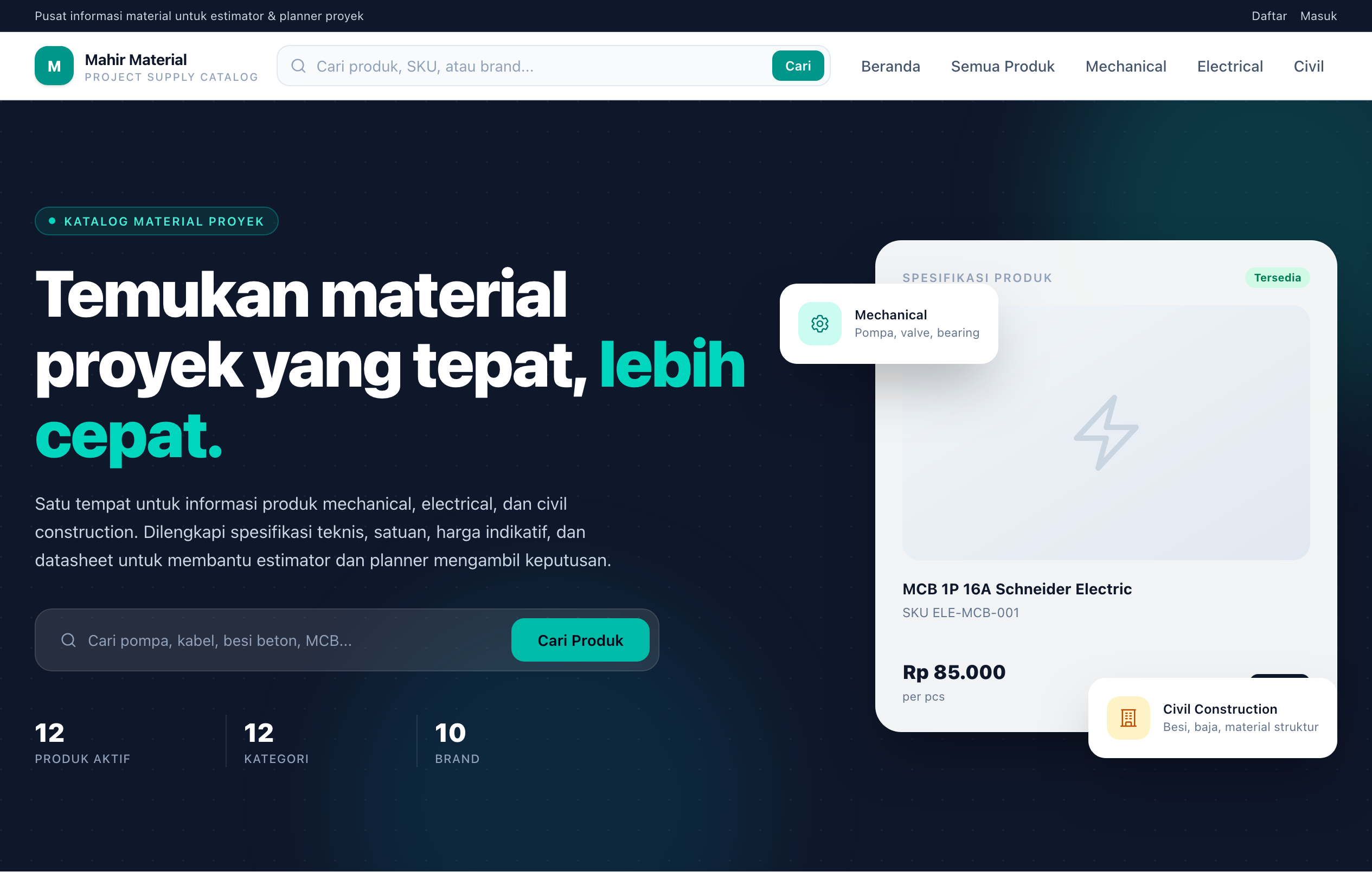
On the public homepage, visitors immediately see:
- A search-first hero section with live counts of active products, categories, and brands.
- Category cards that show how many products each discipline contains.
- The newest product entries and a selection of recognized brands.
- A clear path into the full catalog or the CSV import workflow.
The catalog is public by design. Anyone can browse and compare products, while the deeper project management and reporting tools are reserved for active subscribers.
Built for the way estimators actually search
A catalog is only useful if people can find the right product quickly. The product listing page supports:
- Full-text search across product name, SKU, description, brand name, and category name.
- Category filtering that automatically includes subcategories.
- Brand filtering using clean, URL-friendly slugs.
- Stock status filters for available, limited, pre-order, and out-of-stock items.
- Sorting by newest, name, lowest price, and highest price — with products priced "on request" handled sensibly at the end of the list.
- Pagination that preserves the active query string, so filters survive page changes.
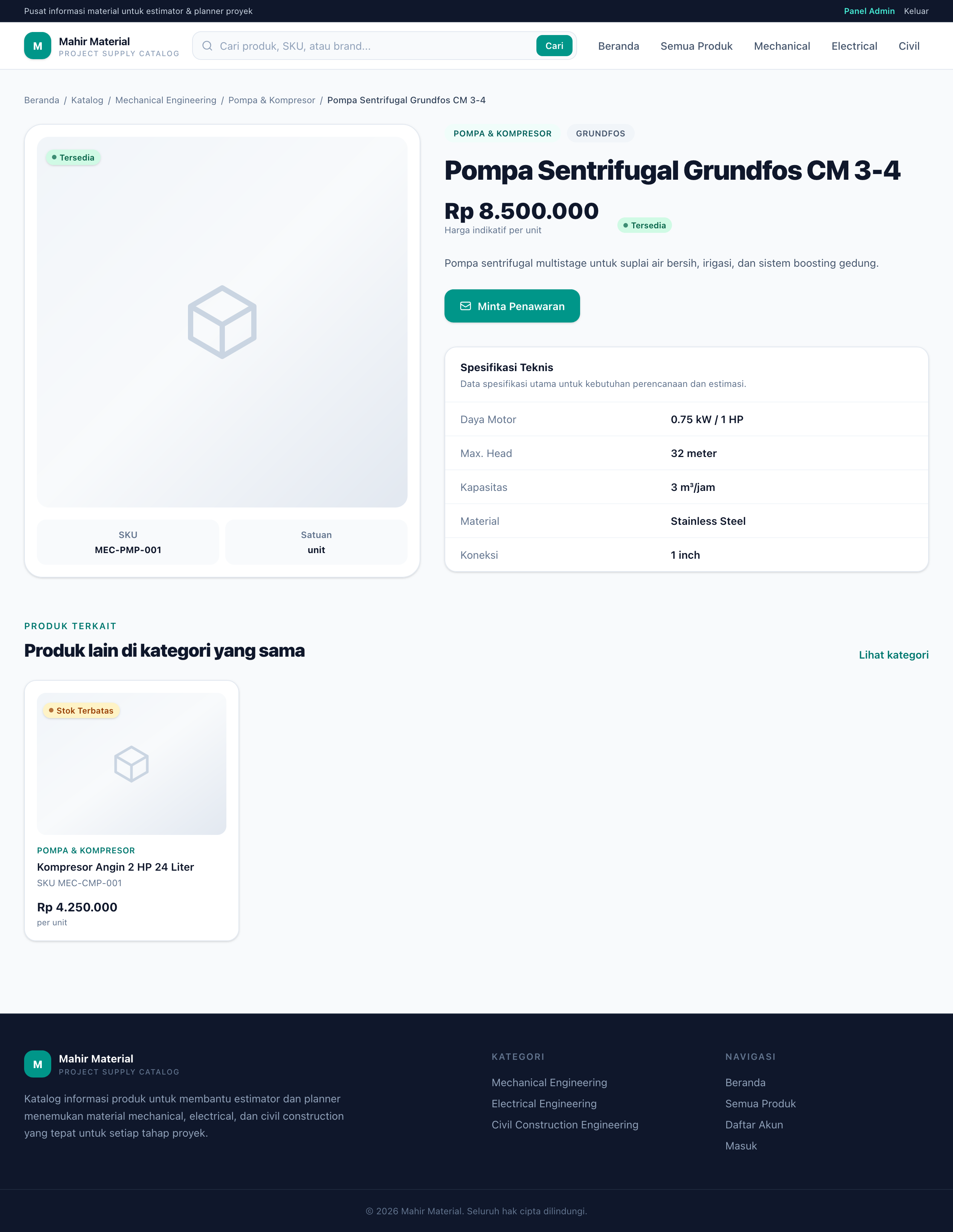
Each product detail page is structured around decision-making rather than decoration. It includes the product name, SKU, category, brand, unit, indicative price in Indonesian rupiah, stock status, description, and a specification table built from named/value pairs. Datasheet links and product images are supported, and a related-products section keeps the buyer exploring within the same category.
Prices are clearly framed as indicative. When a product has no price, the interface shows "Sesuai permintaan" ("price on request") instead of pretending a number exists. For an estimator, that honesty is a feature.
An admin panel that does the heavy lifting
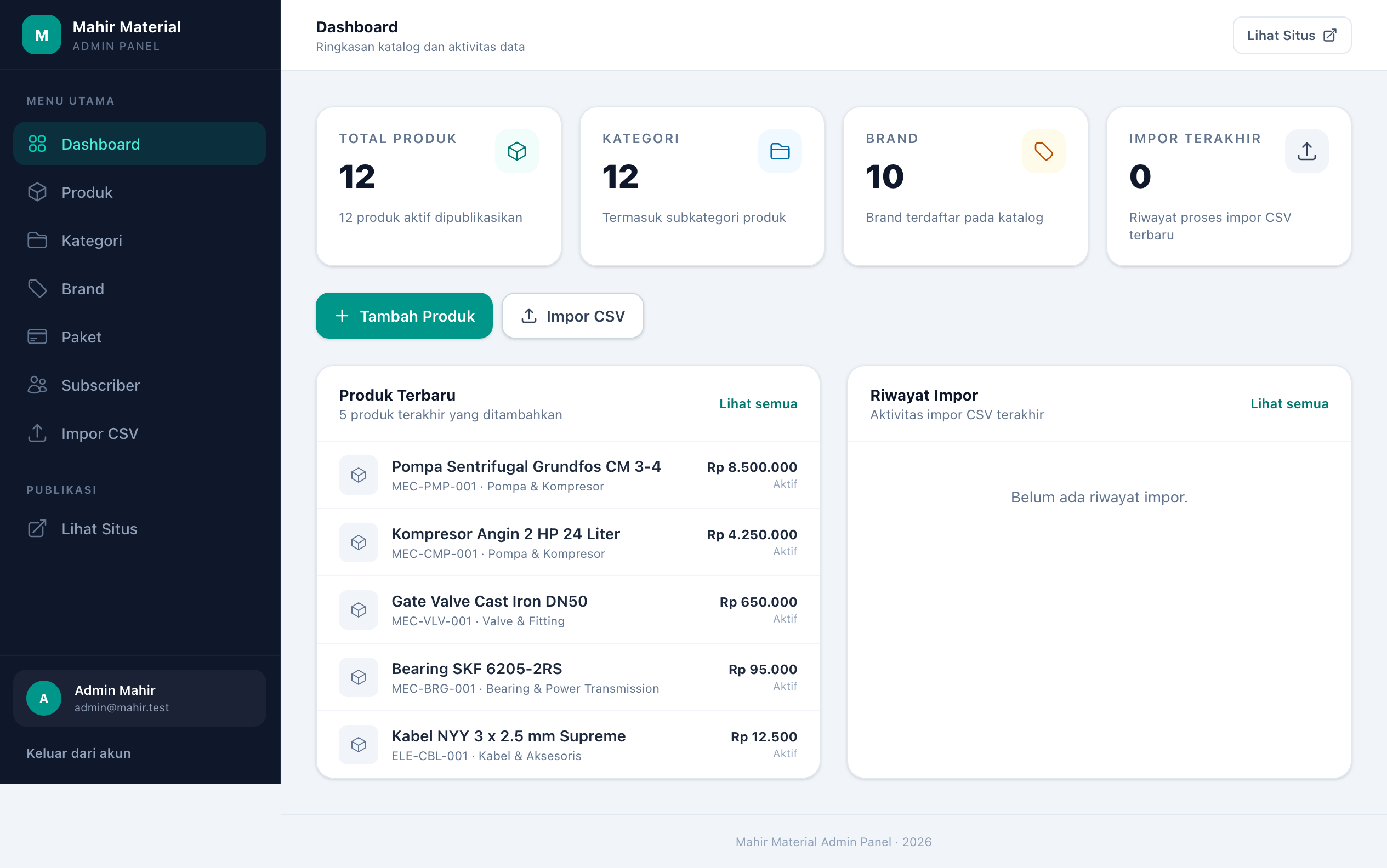
Behind the public catalog is a dedicated admin area protected by an admin check. After logging in, administrators get a dashboard and full control over the data that powers the platform.
The admin panel supports:
- Product CRUD, including categories, brands, units, pricing, currency, stock status, descriptions, structured specifications, datasheet URLs, images, and active/inactive visibility.
- Category management with parent/child nesting, descriptions, icons, sort order, and activation.
- Brand management with logos, descriptions, and activation.
- Subscription plan management with multi-tier pricing, duration in days, feature lists, sort order, and visibility.
- Subscriber management with search, status filters, account activation, and subscription lifecycle actions.
- Import history with per-file totals, statuses, and error previews.
The intent is simple: the admin panel should be complete enough that a non-technical operator can run the catalog without touching the database.
CSV import: bulk data without the bulk work
The feature that most clearly separates Mahir Material from a simple CRUD demo is its **product CSV importer**. Real suppliers do not enter thousands of products by hand, and real data rarely arrives in perfect shape.
The importer handles the messy parts:
- Downloadable template generated straight from the admin panel.
- Automatic delimiter detection for comma, semicolon, and tab-separated files.
- Upsert by SKU — an existing SKU is updated instead of duplicated.
- Automatic category creation from paths like `Kategori Induk/Subkategori`, including nested parent categories.
- Automatic brand creation when a brand name is new.
- Per-row validation with clear error messages.
- Downloadable error report listing the row number, SKU, and reason for every failed row.
- Non-destructive updates — empty optional columns do not erase existing data on update.
- Indonesian column aliases, so headers like `kode`, `nama`, `kategori`, `merek`, `satuan`, `harga`, and `stok` work out of the box.
- Flexible value parsing for prices in local number formats, stock statuses in English or Indonesian, active flags, and specifications written as `Name=Value; Name2=Value2` or JSON.
Each import is recorded with total rows, imported count, updated count, failed count, failure reason, and a timestamp. Operators can review the import history, preview errors, and download the full error CSV for cleanup. It turns what is usually a painful data migration into a repeatable, auditable workflow.
## Subscriptions that match a real business model
Mahir Material is not just a catalog — it is the foundation of a subscription business. Administrators can define multiple plans, each with a name, description, price, currency, duration, feature list, sort order, and active status. The included seeder ships with example Basic, Pro, and Enterprise tiers, and the UI renders human-friendly duration labels such as "1 bulan" or "1 tahun".
The subscriber journey is intentionally controlled:
1. A visitor registers with name, email, and password.
2. The new account is created in pending status and cannot sign in yet.
3. The registration confirmation page offers a "Kirim Pemberitahuan ke Admin" button that opens WhatsApp with a pre-filled message containing the registrant's name and email. The admin number is configured through `ADMIN_WHATSAPP_NUMBER`.
4. An administrator opens **Admin → Subscriber**, filters for pending accounts, and activates the account.
5. The administrator assigns, activates, extends, or cancels a subscription plan from the subscriber detail page.
6. Once the subscription is active, the subscriber gains access to project management and PDF reports.
Access control is enforced at the middleware level. An authenticated user without an active subscription is redirected to their dashboard with a clear message to contact the admin. Public catalog browsing remains open throughout.
This is a pragmatic model for a business that wants to onboard customers manually — through a sales conversation, a WhatsApp message, or an invoice — without building a payment gateway on day one.
From catalog to project report in minutes
The subscriber workspace is where the catalog becomes useful work. Subscribers can create projects with a name, client, location, description, and status (draft or final). Inside a project, they can:
- Search the live catalog by product name, SKU, or brand.
- Add products to the project with a quantity and optional notes.
- Update quantities inline.
- Remove items they no longer need.
- See indicative pricing and subtotals calculated automatically.
- View the total indicative price for the entire project.
- Open a formatted report and download it as a PDF.
The PDF report is designed to be handed to a client or kept in the project file. It includes branding, project metadata, client and location, who prepared the report, project status, a numbered material table with SKU, quantity, unit, price, and subtotal, plus a clearly labeled indicative total and a disclaimer that final pricing must be confirmed with sales. Filenames are generated from the project name and date, so downloaded reports stay organized.
Projects are ownership-scoped: every project route verifies that the authenticated subscriber owns the project before showing or modifying it. Draft and final statuses give teams a simple way to signal whether a material list is still being worked on or ready to share.
## Who it is for
Mahir Material fits several adjacent use cases:
- Estimators and quantity surveyors who need fast access to structured product data and a clean material list.
- Project planners and engineers who compare equipment and components across brands.
- Procurement teams who want indicative pricing and datasheets in one place.
- Suppliers and distributors who want to publish a branded, searchable product catalog and gate detailed project tools behind a subscription.
- Consultants and contractors who repeatedly assemble material lists and need a professional PDF output.
Because the catalog is public, it also works as a marketing asset: search engines and prospective customers can discover products, while the subscription unlocks the workflow tools that keep customers coming back.
## Feature highlights at a glance
What you get
Public catalog : Search, category and subcategory filters, brand filters, stock filters, sorting, pagination, rich product pages
Product data :SKU, unit, indicative price, stock status, descriptions, structured specifications, datasheets, images
Admin : Dashboard, product/category/brand CRUD, plan management, subscriber management, import history
Bulk data : CSV template, delimiter detection, SKU upsert, automatic categories and brands, per-row validation, downloadable error reports
Subscriptions : Multi-tier plans, manual account activation, activate/extend/cancel subscriptions, middleware gating
Subscriber tools : Project workspaces, catalog search inside projects, quantities and notes, indicative totals, PDF reports
Getting started
Mahir Material solves a narrow but expensive problem: project teams waste time finding, trusting, and formatting material information. By pairing a polished public catalog with structured product data, a forgiving CSV importer, subscription controls, and a project-to-PDF workflow, it delivers a complete loop — from product discovery to a shareable material report.
It is a strong starting point for a niche catalog business, a supplier portal, or an internal tool for an estimating team. The hard parts are already structured: the data model, the access rules, the import pipeline, and the report output. What remains is the part only you can decide — the products you curate and the customers you serve.
Visit us on https://materials.mahirgroups.com/
# Mahir Material: The Project Supply Catalog That Keeps Estimators and Planners Moving
Ask any estimator how a project really begins, and you rarely hear about drawings first. You hear about the search: a pump curve here, an MCB datasheet there, a WhatsApp thread about steel bar availability, and a spreadsheet held together with hope. Product information for mechanical, electrical, and civil construction work is scattered across catalogs, PDFs, and supplier inboxes — and every hour spent hunting is an hour not spent estimating.
Mahir Material was built to fix that. It is a focused product information platform for project teams, combining a clean public catalog, a structured admin back office, subscription management, and a project workspace that turns a list of materials into a presentable PDF report.
This article walks through what the application does, who it serves, and why it is a practical foundation for anyone selling product data, project planning tools, or a subscription-based supply catalog.
One catalog, three engineering disciplines
Mahir Material is organized around the way project work is actually split: Mechanical Engineering, Electrical Engineering, and Civil Construction Engineering. Categories support subcategories, so a product can live under a path like `Mechanical Engineering / Pompa & Kompresor` without forcing the entire catalog into a flat list.
On the public homepage, visitors immediately see:
- A search-first hero section with live counts of active products, categories, and brands.
- Category cards that show how many products each discipline contains.
- The newest product entries and a selection of recognized brands.
- A clear path into the full catalog or the CSV import workflow.
The catalog is public by design. Anyone can browse and compare products, while the deeper project management and reporting tools are reserved for active subscribers.
Built for the way estimators actually search
A catalog is only useful if people can find the right product quickly. The product listing page supports:
- Full-text search across product name, SKU, description, brand name, and category name.
- Category filtering that automatically includes subcategories.
- Brand filtering using clean, URL-friendly slugs.
- Stock status filters for available, limited, pre-order, and out-of-stock items.
- Sorting by newest, name, lowest price, and highest price — with products priced "on request" handled sensibly at the end of the list.
- Pagination that preserves the active query string, so filters survive page changes.
Each product detail page is structured around decision-making rather than decoration. It includes the product name, SKU, category, brand, unit, indicative price in Indonesian rupiah, stock status, description, and a specification table built from named/value pairs. Datasheet links and product images are supported, and a related-products section keeps the buyer exploring within the same category.
Prices are clearly framed as indicative. When a product has no price, the interface shows "Sesuai permintaan" ("price on request") instead of pretending a number exists. For an estimator, that honesty is a feature.
An admin panel that does the heavy lifting
Behind the public catalog is a dedicated admin area protected by an admin check. After logging in, administrators get a dashboard and full control over the data that powers the platform.
The admin panel supports:
- Product CRUD, including categories, brands, units, pricing, currency, stock status, descriptions, structured specifications, datasheet URLs, images, and active/inactive visibility.
- Category management with parent/child nesting, descriptions, icons, sort order, and activation.
- Brand management with logos, descriptions, and activation.
- Subscription plan management with multi-tier pricing, duration in days, feature lists, sort order, and visibility.
- Subscriber management with search, status filters, account activation, and subscription lifecycle actions.
- Import history with per-file totals, statuses, and error previews.
The intent is simple: the admin panel should be complete enough that a non-technical operator can run the catalog without touching the database.
CSV import: bulk data without the bulk work
The feature that most clearly separates Mahir Material from a simple CRUD demo is its **product CSV importer**. Real suppliers do not enter thousands of products by hand, and real data rarely arrives in perfect shape.
The importer handles the messy parts:
- Downloadable template generated straight from the admin panel.
- Automatic delimiter detection for comma, semicolon, and tab-separated files.
- Upsert by SKU — an existing SKU is updated instead of duplicated.
- Automatic category creation from paths like `Kategori Induk/Subkategori`, including nested parent categories.
- Automatic brand creation when a brand name is new.
- Per-row validation with clear error messages.
- Downloadable error report listing the row number, SKU, and reason for every failed row.
- Non-destructive updates — empty optional columns do not erase existing data on update.
- Indonesian column aliases, so headers like `kode`, `nama`, `kategori`, `merek`, `satuan`, `harga`, and `stok` work out of the box.
- Flexible value parsing for prices in local number formats, stock statuses in English or Indonesian, active flags, and specifications written as `Name=Value; Name2=Value2` or JSON.
Each import is recorded with total rows, imported count, updated count, failed count, failure reason, and a timestamp. Operators can review the import history, preview errors, and download the full error CSV for cleanup. It turns what is usually a painful data migration into a repeatable, auditable workflow.
## Subscriptions that match a real business model
Mahir Material is not just a catalog — it is the foundation of a subscription business. Administrators can define multiple plans, each with a name, description, price, currency, duration, feature list, sort order, and active status. The included seeder ships with example Basic, Pro, and Enterprise tiers, and the UI renders human-friendly duration labels such as "1 bulan" or "1 tahun".
The subscriber journey is intentionally controlled:
1. A visitor registers with name, email, and password.
2. The new account is created in pending status and cannot sign in yet.
3. The registration confirmation page offers a "Kirim Pemberitahuan ke Admin" button that opens WhatsApp with a pre-filled message containing the registrant's name and email. The admin number is configured through `ADMIN_WHATSAPP_NUMBER`.
4. An administrator opens **Admin → Subscriber**, filters for pending accounts, and activates the account.
5. The administrator assigns, activates, extends, or cancels a subscription plan from the subscriber detail page.
6. Once the subscription is active, the subscriber gains access to project management and PDF reports.
Access control is enforced at the middleware level. An authenticated user without an active subscription is redirected to their dashboard with a clear message to contact the admin. Public catalog browsing remains open throughout.
This is a pragmatic model for a business that wants to onboard customers manually — through a sales conversation, a WhatsApp message, or an invoice — without building a payment gateway on day one.
From catalog to project report in minutes
The subscriber workspace is where the catalog becomes useful work. Subscribers can create projects with a name, client, location, description, and status (draft or final). Inside a project, they can:
- Search the live catalog by product name, SKU, or brand.
- Add products to the project with a quantity and optional notes.
- Update quantities inline.
- Remove items they no longer need.
- See indicative pricing and subtotals calculated automatically.
- View the total indicative price for the entire project.
- Open a formatted report and download it as a PDF.
The PDF report is designed to be handed to a client or kept in the project file. It includes branding, project metadata, client and location, who prepared the report, project status, a numbered material table with SKU, quantity, unit, price, and subtotal, plus a clearly labeled indicative total and a disclaimer that final pricing must be confirmed with sales. Filenames are generated from the project name and date, so downloaded reports stay organized.
Projects are ownership-scoped: every project route verifies that the authenticated subscriber owns the project before showing or modifying it. Draft and final statuses give teams a simple way to signal whether a material list is still being worked on or ready to share.
## Who it is for
Mahir Material fits several adjacent use cases:
- Estimators and quantity surveyors who need fast access to structured product data and a clean material list.
- Project planners and engineers who compare equipment and components across brands.
- Procurement teams who want indicative pricing and datasheets in one place.
- Suppliers and distributors who want to publish a branded, searchable product catalog and gate detailed project tools behind a subscription.
- Consultants and contractors who repeatedly assemble material lists and need a professional PDF output.
Because the catalog is public, it also works as a marketing asset: search engines and prospective customers can discover products, while the subscription unlocks the workflow tools that keep customers coming back.
## Feature highlights at a glance
What you get
Public catalog : Search, category and subcategory filters, brand filters, stock filters, sorting, pagination, rich product pages
Product data :SKU, unit, indicative price, stock status, descriptions, structured specifications, datasheets, images
Admin : Dashboard, product/category/brand CRUD, plan management, subscriber management, import history
Bulk data : CSV template, delimiter detection, SKU upsert, automatic categories and brands, per-row validation, downloadable error reports
Subscriptions : Multi-tier plans, manual account activation, activate/extend/cancel subscriptions, middleware gating
Subscriber tools : Project workspaces, catalog search inside projects, quantities and notes, indicative totals, PDF reports
Getting started
Mahir Material solves a narrow but expensive problem: project teams waste time finding, trusting, and formatting material information. By pairing a polished public catalog with structured product data, a forgiving CSV importer, subscription controls, and a project-to-PDF workflow, it delivers a complete loop — from product discovery to a shareable material report.
It is a strong starting point for a niche catalog business, a supplier portal, or an internal tool for an estimating team. The hard parts are already structured: the data model, the access rules, the import pipeline, and the report output. What remains is the part only you can decide — the products you curate and the customers you serve.
Visit us on https://materials.mahirgroups.com/